The Input key
The remote's Input button opens an Inputs picker over the running app.
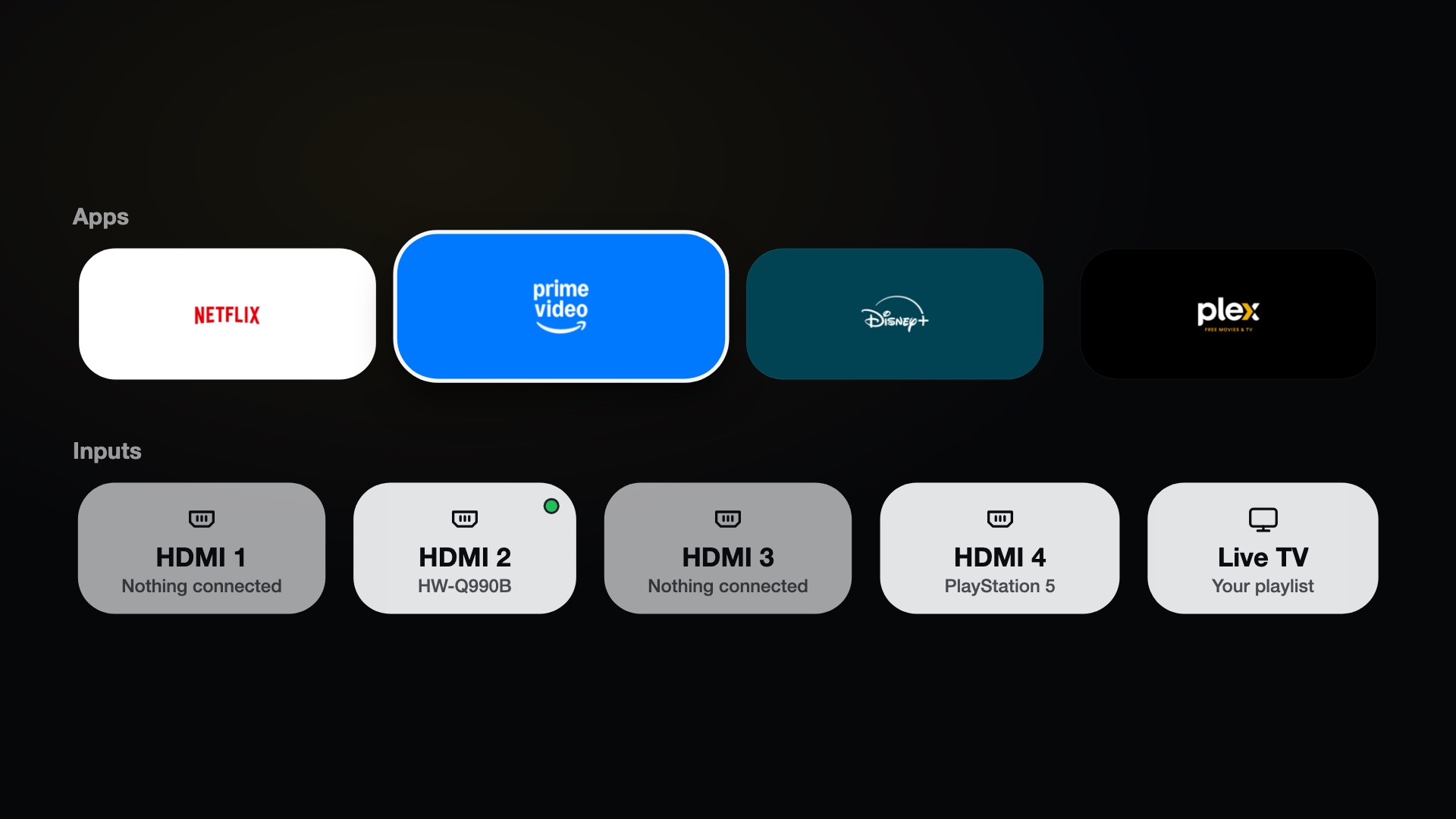
The picker shows the dock apps in a row, with a green dot on the ones that are open when that is switched on in the launcher's Customise, the inputs below (each with its port and what is connected, and a green dot on the active one) and, when Live TV is on, Live TV. A device's name wraps onto a second line, with an ellipsis at the end of that line when it is longer still, so a long name (HDMI-CEC ones can be) never runs over the cards beside it.
| Key | Action |
|---|---|
| Left / Right | Move |
| Up / Down | Switch rows |
| OK | Open |
| Hold OK on an HDMI input | Put it on Home as a tile, or take it off again (An input on Home) |
| Back or Input | Close |
The pointer works too.
What the key shows
The Input button can show the Inputs list in three ways. Input key > Input key shows in the manager app chooses; each press of that row goes to the next one.
| Choice | What happens | Default |
|---|---|---|
| Over the running app, ready in the background | A small app, com.cleanyourtv.picker, is started hidden after boot and the key only wakes it: instant. |
webOS 25 (SDK 10) |
| Over the running app, started when pressed | The same app is started by the key and closes itself after use (Back, a choice, or ten idle seconds). Nothing runs hidden, so it cannot keep the remote. The first moment takes longer. | every other webOS version (5, 6, and 26 until the background app has been tried there) |
| The launcher's Inputs list | The TV goes to Home with the Inputs list open. Needs CleanYourTV as Home; when LG's Home is selected the key stays with LG. | none |
On webOS 6.5 (reports) the hidden background app kept the remote and showed a loading circle, which is why older webOS starts it on
demand. The background app is only kept while the hook attached: without the hook the key cannot open it. If the TV closes the background app three times in ten minutes, the service switches to started when pressed by itself
(picker.mode: ondemand in config.json). Other overlay projects for rooted TVs also start their overlay on demand and close it after
use.
How it works
It uses the bundled inputhook library, which injects a small hook into LG's input process so that a remote
button can run a command. The Input button's code is 241 by default. The command opens the picker app
(com.cleanyourtv.picker) over whatever is on screen.
The hook goes into lginput2, LG's input service, where the remote's keys arrive on webOS 5 and newer. Other processes
(micomservice and a few more) are only used on firmware without lginput2: hooked into micomservice, the hook replaced a
function that process also uses to pass the remote's keys on to HDMI-CEC devices and the soundbar, and after a boot the remote no
longer controlled a set-top box and eARC stopped working (issue 23).
Learning your remote's code
Remotes differ. In the manager app, Input key > Learn the Input key reads the code of the button you press and tests that the picker opens. Clear restores the default.
The switch in the same menu removes the bind and gives the button back to LG's own picker. The optional Learn the Home key is under CleanYourTV as Home.
The Guide button can be bound the same way; that is part of Live TV (manager app > Live TV > Learn the Guide key).
When the hook is not attached
On some firmware the hook cannot attach. The manager then shows the Input key as not available and LG's picker is used.