Themes
A theme changes how the home screen looks: colours, the size of tiles and text, the number of columns, the clock, the ambient glow, the speed of animations and a wallpaper. Themes apply to the launcher's home screen (dock, top shelf, grid, top buttons and menus). Live TV, the Inputs picker and the notification cards keep their own look.
In the launcher, Customise > Theme lists the themes; choosing one applies it at once (a theme that is not on the TV yet is downloaded first). Go back to the previous theme is at the bottom of the list. Customise > Accent colour sets the colour of the focus ring and of the highlighted button or menu row, on top of any theme. The theme list shows the highlighted theme's screenshot and description. The Inputs picker and the Live TV banner and guide follow the theme's colours, accent and typeface too. Your own photos can replace a theme's background: see Wallpapers.
Where the themes come from
Themes are not part of the service. They are read from the themes/
folder of the GitHub repository (the main branch):
- The service downloads
themes/index.json(the list) when you open Theme. - Choosing a theme downloads its
theme.jsonand its wallpaper to the TV (/media/developer/cleanyourtv/themes/<id>/) and keeps them, so it keeps working offline. Choosing it again downloads the latest version. If GitHub cannot be reached, the list shows the themes that are already on the TV and says why. - Classic is built into the service and always works.
- A theme is data only (values, an image): the service checks every value, limits the file sizes (theme 32 KB, wallpaper 1.5 MB, screenshot 600 KB) and checks that the images are images. There is no script or CSS in a theme.
The themes
| Theme | What it is |
|---|---|
| Classic | The original look: near-black, white focus, ten columns. The default. |
| Midnight | Deep blue with a wallpaper and a blue focus. |
| OLED black | Pure black and no ambient glow, so unlit pixels stay off. |
| Warm | Brown and amber, with the glow in the accent colour and a wallpaper. |
| Compact | Twelve columns of smaller tiles: more apps on screen. |
| Large print | Eight columns of big tiles and larger text. |
| Still | No animation and a quiet glow. |
| Bloom | A flower wallpaper with the dock in a glass panel at the bottom. Down moves the dock up and the apps appear below it, centred. |
| Horizon | A row of seven square apps along the bottom of a dusk landscape, the clock on the left and the buttons on the right at the top. Down moves the row up and shows all apps below it. |
| Pixel | Pixel art: a blocky typeface, square tiles and buttons, a yellow focus box and a sunset over a lake drawn in big pixels. Moves without animation, like an old console. |
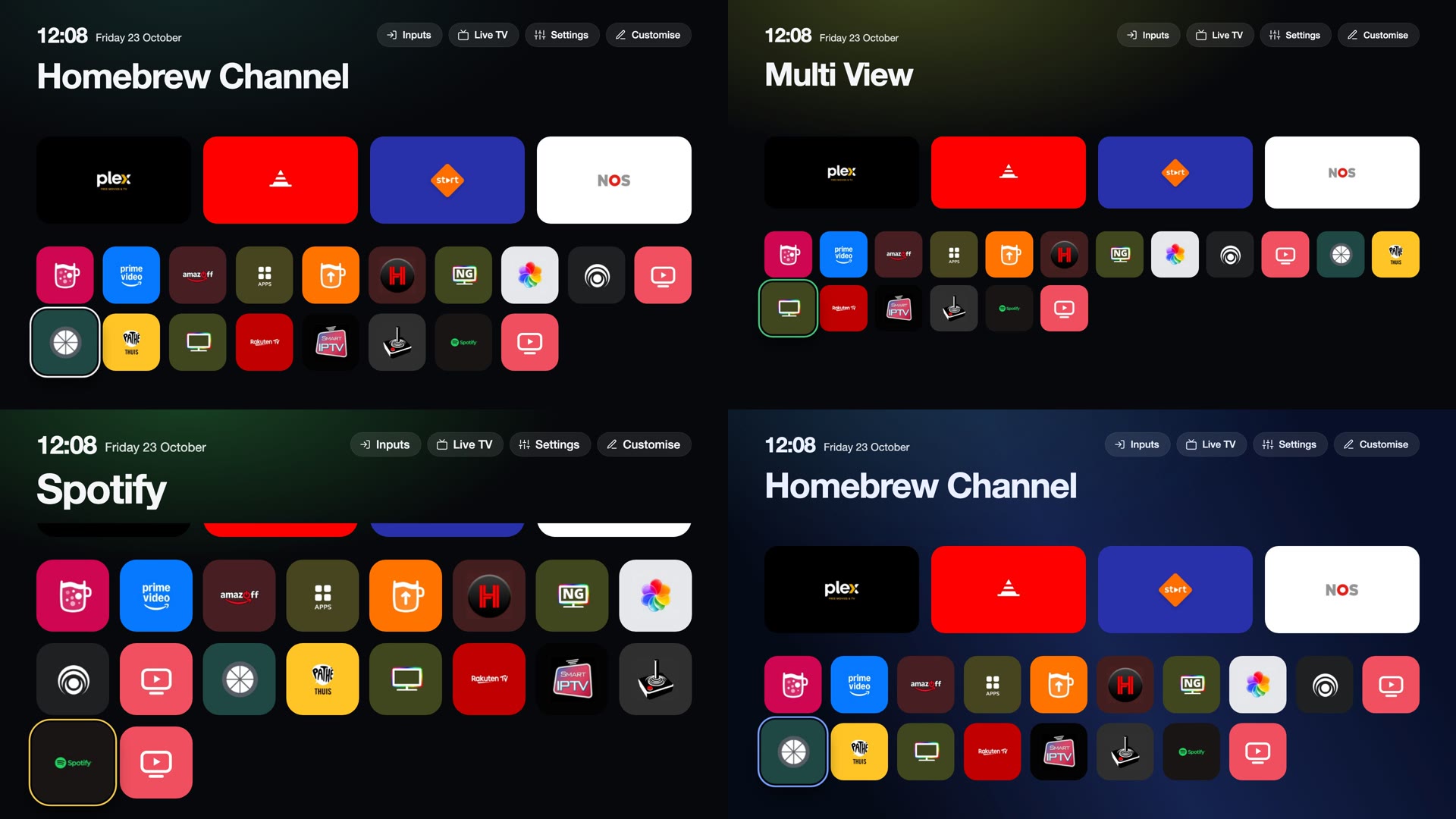
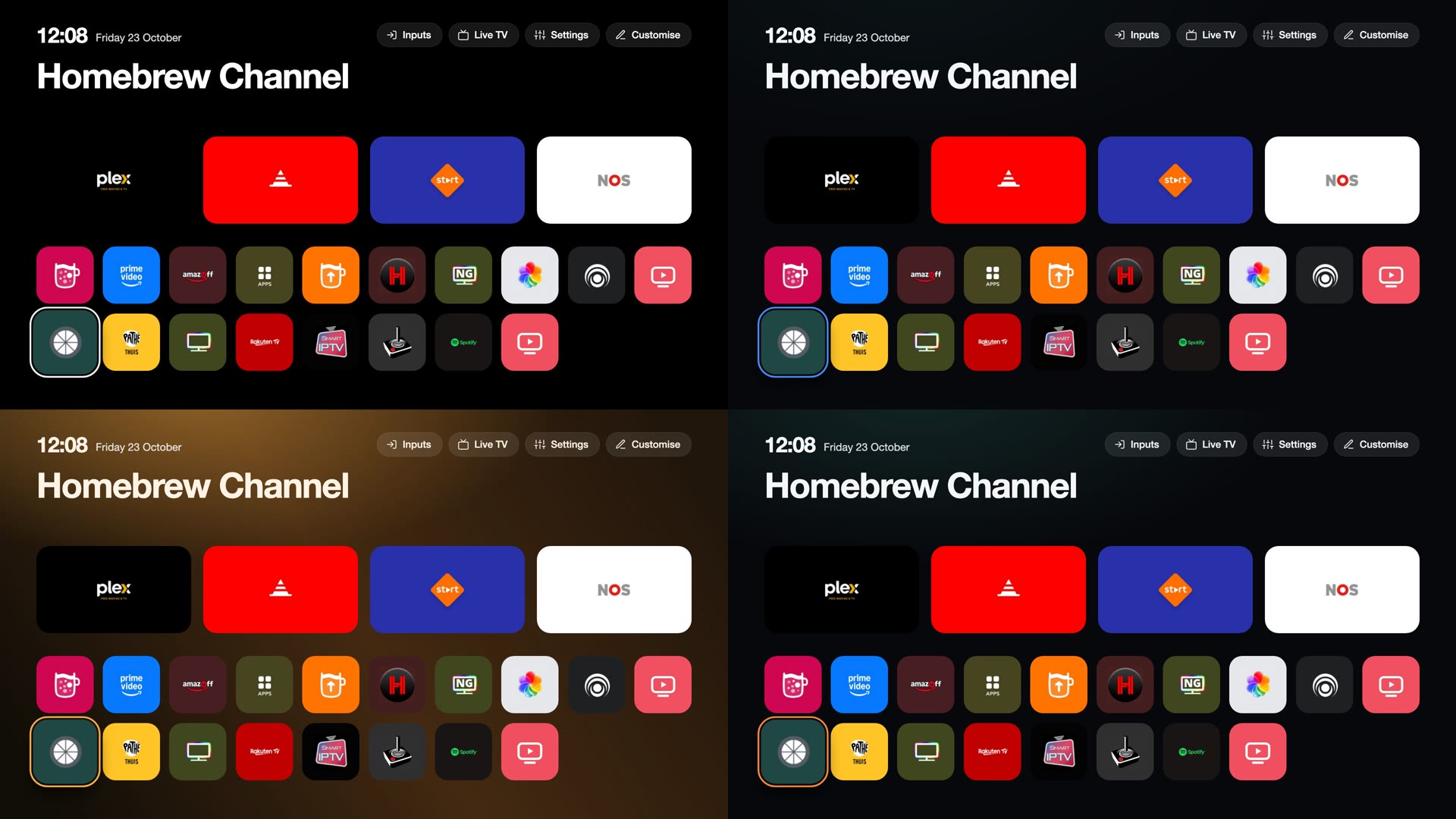
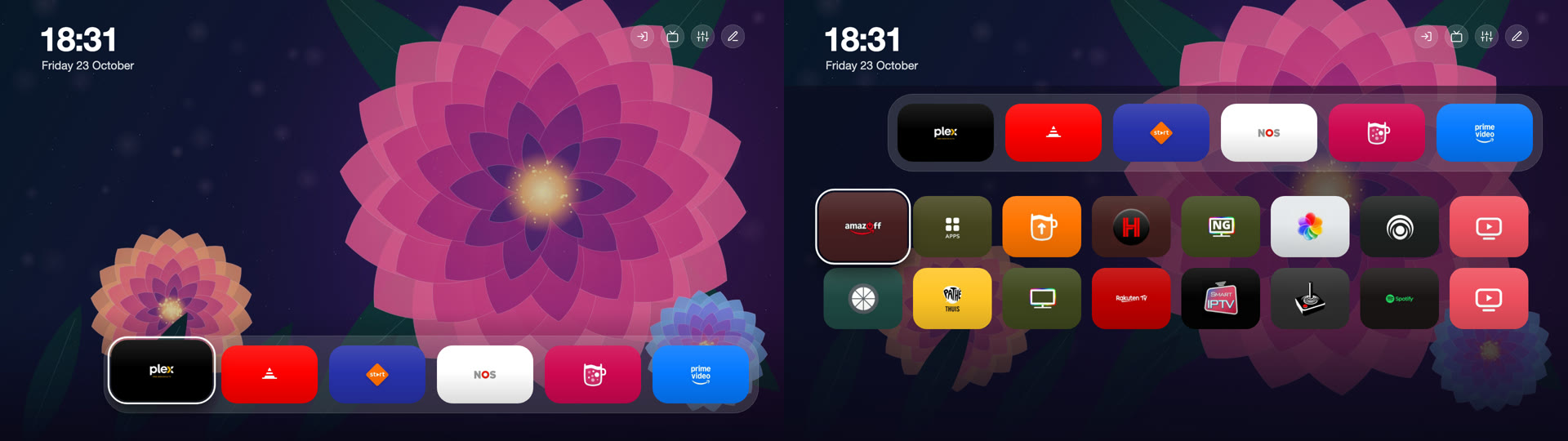
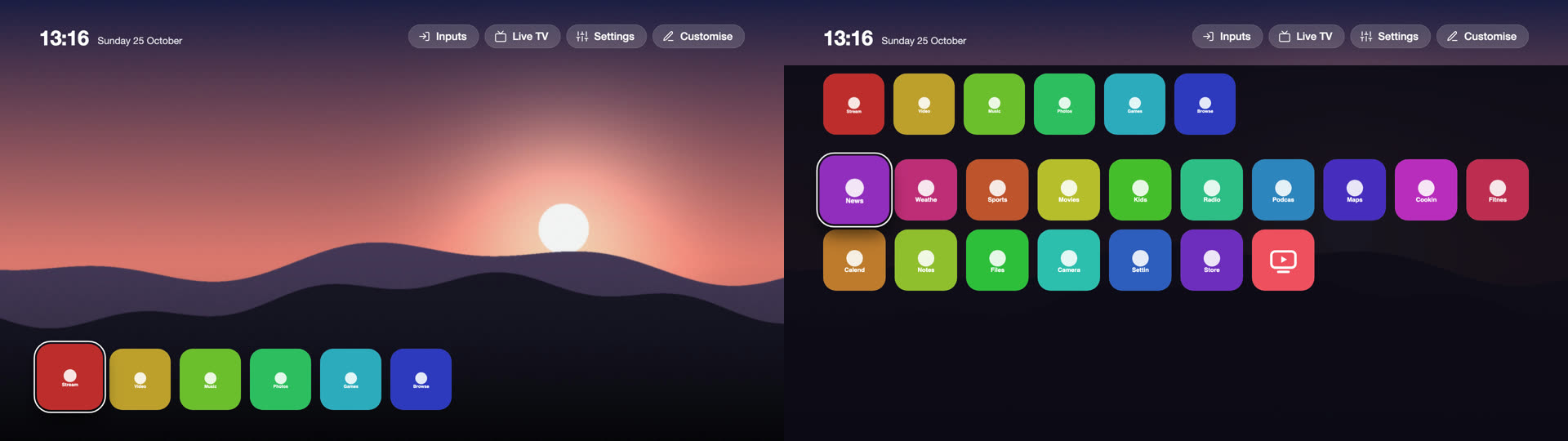
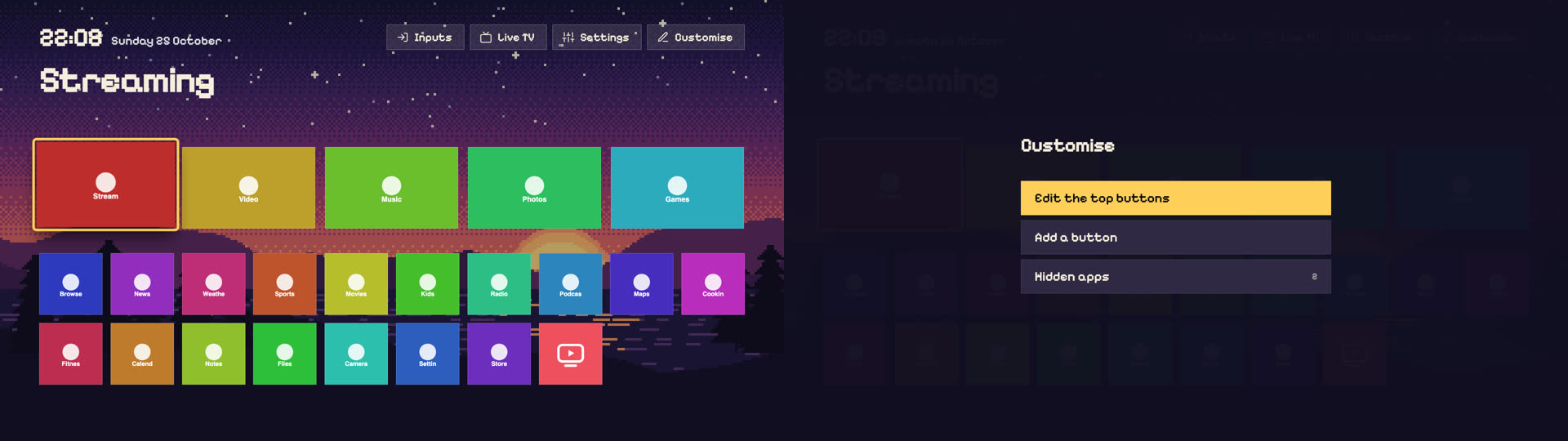
The pictures are the launcher page rendered in a browser with each theme.
Contributing a theme
Themes live in the repository, so a new one is a pull request:
- Copy a folder from
themes/, for exampleclassic, tothemes/<id>/. The id is lower-case letters, digits and-. - Edit
theme.json; the rest keeps its default, or the value of the theme named in"extends". - Add
preview.jpg: a screenshot of the home screen with your theme (16:9, about 800 px wide, at most 600 KB). - If it uses a wallpaper, add the image to the same folder (
.jpg,.pngor.webp, at most 1.5 MB, 1920 x 1080) and name it ineffects.wallpaper. A typeface goes in the folder too, named intype.fontFile, with its licence file. A wallpaper or typeface must be your own work or under a licence that allows redistribution; say which in the pull request. - Run
node tools/theme-index.jsto updatethemes/index.json, thennode tools/test.js theme: it checks every theme folder against the schema, that the screenshot is there, and that the index is up to date. - Open the pull request. Once it is merged into
main, every TV can download the theme; no release is needed.
When you add a setting to the engine, add one row to SCHEMA in helper/themeschema.js, read its variable in the launcher's CSS (app/src/css/, then node tools/build-pages.js), and run
node tools/theme-docs.js to regenerate the table below.
Making a theme with an AI assistant
An assistant such as Claude can write a theme from a description ("a calm blue theme with big tiles and the dock at the bottom"). Give it a checkout of the repository (or these files) and the rules below.
What it needs to read
- The table of settings further down this page (or SCHEMA in helper/themeschema.js, the source of that table): every key, its range and its default.
- themes/classic/theme.json and one existing theme that is close to the goal, for example themes/bloom/theme.json.
- themes/README.md for the folder layout.
Rules
- A theme is data only: themes/<id>/theme.json with keys from the table, nothing else. No CSS, no script, no URLs. Unknown keys and
out-of-range values are ignored or clamped, so a value that is not in the table has no effect.
- Positions and sizes are pixels on a 1920 x 1080 canvas. Keep the clock and the buttons at least 60 px from the screen edges (TVs can
crop the picture), and make sure the dock fits: dock.count x dock.w plus the gaps must be at most the screen width (a panel adds
dock.panelPad on each side).
- Text must stay readable: about 4.5 : 1 between colors.ink and the surfaces it sits on, and a visible focus ring. The text colour on the
accent is chosen automatically.
- The TV's graphics chip is weak: no blurred or animated wallpapers, one static image at most, 1920 x 1080, at most 1.5 MB (.jpg,
.png or .webp), kept in the theme's folder and named in effects.wallpaper. Prefer the dock and grid settings over tricks.
- A wallpaper must be original (drawn or generated for the theme) or under a licence that allows redistribution. Do not copy other
people's artwork, screenshots or logos, and do not use brand names or trademarks in a theme.
- Use "extends" to start from another theme and list only what changes. Do not rename a setting group: name, author, description and
extends are the theme's own fields.
Steps
1. Create themes/<id>/theme.json (and the wallpaper, if any).
2. Look at it: node tools/theme-preview.mjs <id> --out /tmp/preview renders the home screen with made-up apps in headless Chrome and writes
rest.png (home), grid.png (the focus moved down into the apps) and menu.png (a menu). It needs Node.js 22 or newer and Chrome. Open
the images, fix what looks wrong (overlapping parts, unreadable text, clipped tiles) and render again.
3. When it looks right, node tools/theme-preview.mjs <id> --write also writes themes/<id>/preview.jpg (needs ffmpeg), the screenshot the TV shows.
4. node tools/theme-index.js updates themes/index.json; node tools/test.js theme checks every theme folder, the screenshot and the index.
5. Commit and open a pull request; say where the wallpaper comes from.
A prompt to start with
Create a theme for CleanYourTV. Read the settings table in
docs/themes.md,themes/classic/theme.jsonandthemes/bloom/theme.json. The theme: describe the look and the layout you want. Writethemes/<id>/theme.jsonusing only keys from the table (data only; ranges are enforced), generate an original wallpaper if it needs one (1920 x 1080, under 1.5 MB, saved in the theme's folder), render it withnode tools/theme-preview.mjs <id> --out /tmp/preview, look atrest.png,grid.pngandmenu.png, fix problems and render again, then runnode tools/theme-preview.mjs <id> --write,node tools/theme-index.jsandnode tools/test.js theme. Keep text readable and the wallpaper my own work.
Theme files
A theme is themes/<id>/theme.json in the repository. Every key is optional.
A missing or invalid value keeps the value of the theme named in "extends", or the default, which is the original look, so a
theme lists only what it changes. Positions and sizes are in pixels on a 1920 x 1080 canvas.
{
  "name": "Midnight",
  "author": "CleanYourTV",
  "description": "Deep blue with a soft wallpaper and a blue focus.",
  "extends": "classic",
  "colors": { "night": "#060a18", "panel": "#101830", "ink": "#eaf0ff", "accent": "#7aa2ff" },
  "effects": { "glow": 0.8, "wallpaper": "midnight.jpg", "wallpaperDim": 0.25 }
}
What a theme can set
Every part of the home screen has its own position and size, so themes can arrange the screen differently, not only recolour it:
the clock, the top buttons (bar), the large app name, the dock and the grid. Each can be anchored to the top
or bottom edge and aligned left, centre or right, with an offset. A dock at the bottom turns the grid into an overlay that opens
when the focus moves down into it (Back or Up closes it); a dock at the top leaves the grid below it, scrolling.
| Key | Values | Default | |
|---|---|---|---|
| colors | |||
colors.night |
#rrggbb |
#07080b |
Page background. |
colors.panel |
#rrggbb |
#14161b |
Toast background; menu rows are a lighter mix of it. |
colors.ink |
#rrggbb |
#f5f6f8 |
Text. |
colors.accent |
#rrggbb |
#f5f6f8 |
Highlight: the focused button and menu row and, unless colors.focus is set, the focus ring. |
colors.focus |
#rrggbb or empty |
empty | Focus ring colour; empty uses the accent. |
colors.pill |
#rrggbb |
#ffffff |
Colour of the translucent top buttons, with surface.pillAlpha. |
| surface | |||
surface.pillAlpha |
0 to 0.6 | 0.09 |
Opacity of the top buttons. |
surface.pillRing |
0 to 0.8 | 0.1 |
Opacity of the thin outline of the top buttons. |
surface.pillRadius |
0 to 60 | 32 |
Corner radius of the top buttons (pill style only). |
surface.menuAlpha |
0.5 to 1 | 0.97 |
Opacity of the dark layer behind menus. |
surface.rowRadius |
0 to 50 | 30 |
Corner radius of menu rows. |
| type | |||
type.font |
default, serif, mono |
default |
The typeface: the TV's own, a serif or a monospace. |
type.fontFile |
a file name | none | A typeface of the theme: a file in the theme's folder, .woff2, .woff, .ttf or .otf, at most 400 KB, used for all text. Characters it lacks come from type.font. Its licence must allow redistribution; put the licence file in the folder too. |
type.scale |
0.8 to 1.3 | 1 |
Scale of the text of buttons, menus and tiles. |
| clock | |||
clock.show |
true or false |
true |
Show the clock. |
clock.date |
true or false |
true |
Show the date beside or under the time. |
clock.layout |
inline, stack |
inline |
inline: the date beside the time; stack: under it. |
clock.anchor |
top, bottom |
top |
Which screen edge clock.y counts from. |
clock.align |
left, center, right |
left |
Which side clock.x counts from; center centres it. |
clock.x |
0 to 900 | 96 |
Distance from that side, in px (on a 1920 x 1080 canvas). |
clock.y |
0 to 900 | 54 |
Distance from the top or bottom edge, in px. |
clock.scale |
0.6 to 2.5 | 1 |
Scale of the time. |
clock.dateScale |
0.6 to 2 | 1 |
Scale of the date. |
| bar | |||
bar.show |
true or false |
true |
Show the top buttons (Inputs, Settings, Customise, ...). |
bar.style |
pill, round, flat |
pill |
pill: icon and label on a rounded button; round: icon only in a circle; flat: no background. |
bar.labels |
auto, show, hide |
auto |
Button labels: auto shows them except in the round style. |
bar.anchor |
top, bottom |
top |
Which screen edge bar.y counts from. |
bar.align |
left, center, right |
right |
Which side bar.x counts from. |
bar.x |
0 to 900 | 96 |
Distance from that side, in px. |
bar.y |
0 to 900 | 54 |
Distance from the top or bottom edge, in px. |
bar.size |
40 to 100 | 64 |
Height of a button, in px. |
bar.gap |
4 to 40 | 16 |
Space between buttons, in px. |
| shelf | |||
shelf.show |
true or false |
true |
Show the large name of the focused app. |
shelf.align |
left, center, right |
left |
Text alignment of the name. |
shelf.x |
0 to 900 | 96 |
Margin on both sides, in px. |
shelf.y |
0 to 900 | 150 |
Distance from the top edge, in px. |
shelf.scale |
0.4 to 1.6 | 1 |
Scale of the name. |
| dock | |||
dock.anchor |
top, bottom |
top |
Which screen edge dock.y counts from. |
dock.align |
left, center, right |
left |
Which side dock.x counts from; center centres the dock. |
dock.x |
0 to 900 | 96 |
Distance from that side, in px. |
dock.y |
px, 0 to 1000 | empty | Distance from the top or bottom edge, in px. Empty: 360 from the top, 68 from the bottom. |
dock.count |
3 to 8 | 4 |
Apps in the dock. |
dock.w |
120 to 500 | 408 |
Width of a dock tile, in px. |
dock.h |
100 to 300 | 230 |
Height of a dock tile, in px. |
dock.gap |
8 to 60 | 32 |
Space between dock tiles, in px. |
dock.radius |
0 to 80 | 36 |
Corner radius of dock tiles. |
dock.panel |
0 to 0.6 | 0 |
Opacity of a translucent panel behind the dock tiles; 0 for none. |
dock.panelPad |
0 to 60 | 24 |
Space between the panel and the tiles, in px. |
dock.lift |
0 to 40 | 10 |
How far the focused dock tile rises, in px. |
dock.focusScale |
1 to 1.3 | 1.05 |
Scale of the focused dock tile. |
| grid | |||
grid.mode |
below, push, overlay |
below |
below: the grid sits under the dock and scrolls (a dock at the bottom behaves as push); push: the grid sits under the dock out of sight, and when the focus moves down into it the dock moves up to grid.dockUp and the grid appears below it; overlay: the grid opens over the screen above the dock. |
grid.dockUp |
0 to 700 | 220 |
push mode: where the dock stops, counted from the top of the screen, while the grid has the focus, in px. |
grid.align |
left, center |
left |
center centres every row of tiles, also a last row that is not full. |
grid.cols |
4 to 14 | 10 |
Columns. |
grid.tileH |
80 to 240 | 151 |
Height of a tile, in px; the width follows from the columns. |
grid.gapX |
6 to 60 | 24 |
Horizontal space between tiles, in px. |
grid.gapY |
6 to 60 | 26 |
Vertical space between tiles, in px. |
grid.radius |
0 to 100 | 34 |
Corner radius of tiles. |
grid.x |
0 to 900 | 96 |
Distance of the grid from the left edge, in px. |
grid.width |
600 to 1920 | 1728 |
Width of the grid, in px. |
grid.y |
px, 0 to 1000 | empty | Distance of the grid from the top edge, in px. Empty: under the dock, or 290 for an overlay. |
grid.clipTop |
0 to 600 | 300 |
Where scrolled rows disappear at the top, in px (below mode). |
grid.focusScale |
1 to 1.4 | 1.12 |
Scale of the focused tile. |
grid.overlayDim |
0 to 1 | 0.95 |
Opacity of the layer behind the overlay grid. |
grid.overlayH |
200 to 900 | 510 |
Visible height of the overlay grid before it scrolls, in px. |
| tile | |||
tile.gloss |
0 to 1 | 0 |
A light highlight on every tile. |
tile.border |
0 to 0.6 | 0 |
Opacity of a thin outline on every tile. |
tile.ringWidth |
0 to 10 | 4 |
Width of the focus ring, in px; 0 for none. |
tile.ringOffset |
0 to 14 | 4 |
Space between a tile and its focus ring, in px. |
| effects | |||
effects.glow |
0 to 1 | 1 |
Strength of the ambient glow at the top. |
effects.glowColor |
app, accent |
app |
app: taken from the focused icon; accent: the accent colour. |
effects.speed |
0 to 2 | 1 |
Animation speed multiplier; 0 switches the animations off. |
effects.wallpaper |
a file name | none | A file name in themes/wallpapers/: .jpg, .png or .webp, at most 1.5 MB; drawn at 1920 x 1080. |
effects.wallpaperDim |
0 to 0.9 | 0.4 |
How far the wallpaper is darkened with the background colour. |
A theme file holds values only. The service checks every value against the table and clamps numbers to their range; there is no CSS and no script, and a wallpaper is accepted only as a plain file name from the theme's folder that is also a real image of the right type. Anything else is ignored. The launcher draws the wallpaper once and nothing blurs or filters it, because the TV's GPU is weak.
From a shell on the TV: